
Generative AI: When to Buy vs When to Build

Generative AI is no longer a futuristic concept or a side experiment for product teams. It is already embedded in the products we use every day - writing our emails, helping us code, answering customer queries, generating images, and even translating natural language into data insights. What’s interesting is not just that these features exist, but how they are built: behind every “AI-powered” button is a set of concrete design and technical decisions around models, prompts, data, and system architecture. Before diving into the strategic question of whether teams should build their own generative AI capabilities or buy them from existing providers, it’s worth grounding ourselves in how generative AI is being applied in real products today. These examples help demystify what generative AI is actually doing under the hood - and they provide important context for understanding the trade-offs that product leaders must navigate when deciding how to bring AI into their own products.
Generative AI in Action: Examples from Today’s Products
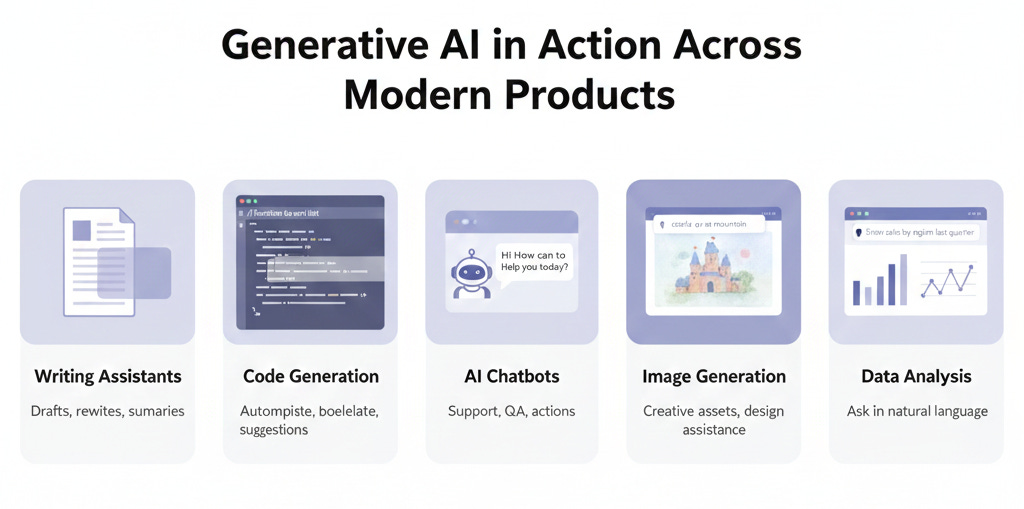
Let’s look at how Generative AI is being used by companies in ways you have likely encountered or can easily relate to. These examples highlight both what the models do and tie back to how they do it using the concepts above:
Smart Writing Assistants: Both Google and Microsoft have introduced AI writing features in their productivity suites. Google’s “Help me Write” in Docs and Gmail, for instance, can draft emails of documents from a brief prompt - essentially an LLM generating text on the user’s behalf. Microsoft 365 Copilot similarly integrates GPT-5 into Word (to draft passages given a command), Outlook (to summarize long email threads or draft replies), and even Teams (to recap meetings). Under the hood, these use prompt engineering to take the user’s context (like an email thread or document content) and feed it into the model with instructions like “Summarize this thread” or “Draft a response about X”. The model’s ability to attend to the context and generate fluent text is what makes this possible. Early user feedback has been that these tools can save tons of time on drudgery - though they require oversight to avoid the occasional mistake (e.g. a misstated fact due to a hallucination).
Code Generation and Dev Tools: If you are a software engineer (or work with engineers), you might have seen GitHub Copilot or Amazon’s CodeWhisperer. These are AI pair-programmers that sure lines or blocks of code as you type. GitHub Copilot, for example, is powered by an LLM fine-tuned on billions of lines of code (OpenAI’s Codex model). As you write a comment like // function to sort a list of numbers, Copilot’s inference will produce a candidate implementation of that function, right in your editor. It works by reading the context (the code written so far, the comment) - thanks to tokenization and attention, it “understands” the intent - and then generating the next tokens which happen to be code. Developers find that it can autocomplete repetitive code, suggest solutions, or at least provide a starting point, significantly boosting productivity. This is generative AI specialized via fine-tuning (on code) and guided by prompt engineering (the comment acts as the prompt). Notably, the model doesn’t always get it right, but it often does, or it produces something the developer can quickly correct.
Customer Support Chatbots: Many companies are deploying chatbots on websites or messaging platforms that are far more advanced than the old decision-tree bots. These new bots, often built on LLMs, can converse with users in natural language, answer questions, and even execute actions. For example, a banking app’s chatbot might answer “How can I reset my password?” or even handle “What’s the interest rate on a 5-year fixed deposit today?” by generating an answer drawn from its knowledge base or by plugging into company data. Some are powered by traditional LLMs like OpenAI, others by open-source LLMs fine-tuned on the company’s FAQs and documents. Embeddings and retrieval play a big role here: a common approach is Retrieval-Augmented Generation (RAG), where the user’s query is used to fetch relevant documents (via embedding similarity search) from company knowledge base, and those documents are included in the prompt so the model can formulate a specific, accurate answer. This way the model’s broad language ability is combined with up-to-date proprietary information. The chatbot’s polite and helpful tone is enforced by instructions (and often RLHF from feedback on good vs bad agent behaviour). Companies across finance, e-commerce, and SaaS are adopting these for 24/7 support - though many keep a human fallback from complex cases.
Image Generation and Design Tools: Beyond text, generative AI is making waves in image creation. Midjourney, DALL-E 2, and Stable Diffusion are examples of AI image generators where you type a description (“a castle on a mountain at sunrise in watercolor style”) and the model generates a new image that matches. These models are based on variants of Transformers and other architectures (like diffusion models) but conceptually similar - they learned from millions of images and captions (pre-training) and can now produce new visuals. Real product tie-ins: Adobe integrated its model Firefly into Photoshop as mentioned. With Generative Fill, a user can select an area of an image and type an instruction like “Add a red balloon in the sky” - the model will fill that area with content that matches the prompt and blends with the background. Canva (a popular design tool) has added an “image from text” feature for creating graphics, and even stock image providers are offering AI-generated media. While the tech differs from text LLMs, the user-facing idea is the same: you can give a prompt, the generative AI produces content. For product managers, this opens up avenues to offer users creative generative capabilities (like customizing product images or creating marketing visuals on the fly) but also challenges around ensuring outputs are appropriate and not infringing on copyrights or ethical norms.
Data Analysis and Visualization: Some newer tools use LLMs to make data analysis more accessible. For instance, products are emerging where a user can ask in plain English, “Show me a bar chart of sales by region for last quarter” and the tool will generate that chart - possibly using an LLM to translate the request into an internal query or code. Here the model might not be directly outputting the final artifact, but it’s mediating between natural language and a more formal action (SQL query, or Python code with matplotlib). Microsoft’s Power BI is experimenting with “ask a question about your data” using GPT, and other startups are doing the same. This is a case of prompt engineering in the background: the system constructs a prompt with the user question plus schema info, the model outputs a helpful intermediate (like code or an explanation), and then the system executes it. This shows generative AI can also serve as a semantic layer to translate user intent within software.
These examples barely scratch the surface, but they illustrate that the concepts - tokenization, embeddings, transformers, fine-tuning, RLHF, prompts - are not just academic. They are actively enabling features in products you use. And because the field is moving fast, product teams need to stay adaptable: what an AI model could not do reliably 6 months ago might be easily doable now with a new model or technique. We have seen text models get better at following instructions (thanks to fine-tuning and RLHF), image models improve in resolution and fidelity, and even multimodal models that combine text-image understanding come to market (e.g., GPT-5 can analyze an image, and models like DALL-E 3 can take detailed text and product art with specific layouts).
Now that we have covered how generative AI works and what it can do, an important strategic question arises for product leaders: when you want to add AI features, do you build your own model or use an existing service? Let’s examine that.
Buy vs. Build: Deploying Generative AI in your Product
One of the biggest decisions for teams incorporating generative AI is whether to build their own models (or heavily customize an open-source model) or buy/use a third part model (via API or licensed service). This choice isn’t binary - many companies do a hybrid - but it’s useful to weigh the considerations of each approach.
Using an off-the-shelf model (Buy)
This could mean calling an API like OpenAI’s, using Azure’s OpenAI service, Google’s PaLM API, or embedding an open-source model that you didn’t train yourself. The advantages are clear:
Speed and Ease: You can get started quickly. For example, with a few API calls you have a working chatbot or text generator, leveraging a model that took millions of dollars to train, all in a day’s work.
Cost Effective (initially): Training a large model from scratch is extremely expensive. Using an existing model as a service shift costs to pay-per-use, which is often cheaper unless you have huge scale.
Continual Improvement: Big providers update their models (like GPT-4 to GPT-5) and you automatically benefit without doing R&D.
Less Expertise Needed: Your team doesn’t need to have ML PhDs tuning hyperparameters for months; the heavy lifting is abstracted away.
Scalability and Infrastructure: Vendors handle hosting, serving, GPU scaling, etc. - things you would otherwise have to build and maintain.
However, there are downsides:
Limited Differentiation: If you and your competitor both just call the same GPT-5 API, the core tech isn’t a differentiator. Off-the-shelf models are generic by design. They might not have specialized knowledge of your niche or proprietary data, and your competitor has access to the same capabilities.
Data Privacy & Compliance: Using external services means sending user data (prompts) to a third party. For sensitive domains (healthcare, finance, enterprise data), this can be a legal/compliance issue. While vendors offer assurances and even on-premises solutions, sharing data is a risk - there have been concerns about models retaining or leaking info from user queries.
Lack of Control: You can’t easily fine-tune the model (unless the provider allows some customization). If the model says something wrong or problematic, you have limited ability to fix that specific behaviour, beyond crafting prompts or post-processing the output. You also rely on the vendor’s uptime, latency, and policy choices.
Cost at Scale: Par-per-call can become expensive as usage grows. If you hit a huge volume (say your app takes off millions of users), at some point using an API might be more costly than running a model yourself - especially if you only need a medium-sized model for your use case.
Building or training your own model (Build)
This doesn’t always mean from scratch - it could mean starting with an open-source and fine-tuning it or training a smaller model on your data. The pros include:
Competitive Advantage: A custom model can be tailored to your product and data, potentially giving better performance for your specific use case than any generic model. It can also incorporate proprietary data that others don’t have, making its outputs unique and valuable to your users.
Data Control: Everything stays in-house. You are not sending queries to outsiders, which is better for sensitive data. You can also train the model on your own user interactions (feedback loops) to continuously improve it - creating a virtuous cycle that competitors can’t easily copy.
Customization: You have full control to tweak architecture, training regimen, fine-tuning, RLHF with criteria you care about, etc. If your brand voice needs to be distinctive, you can enforce that at a model level, not just via prompting.
Potential Cost Efficiency at Scale: If you have very high usage, running your model (especially open-source ones without usage fees) on cloud instances or your own servers might be cheaper than paying per API call. You can optimize models (quantize to lower precision, etc.) to reduce serving costs. Essentially, you capitalize the cost (training/upfront) instead of renting forever.
The cons of building:
High Complexity and Upfront Cost: Training large models is expensive and time-consuming. It requires ML expertise, lots of data, and significant computing infrastructure. Even fine-tuning large models requires expensive GPUs and know-how. If done incorrectly, you could burn a lot of money for subpar results. A 2025 analysis found that 95% of enterprise GenAI pilot projects failed to go beyond prototype, often because companies tried to build when they should have used existing solutions or vice versa.
Longer Time to Market: If could take months, you need to maintain it - handle model drift, update it with new data, fix issues, monitor for bias or inappropriate outputs, and manage the serving infrastructure. This is an ongoing investment. It’s not a one-and-done software - think of it as a new platform to maintain.
Maintenance: Once you have your model, you need to maintain it - handle model drift, update it with new data, fix issues, monitor for bias or inappropriate outputs, and manage the serving infrastructure. This is an ongoing investment. It’s not a one-and-done software - think of it as a new platform to maintain.
Talent Scarcity: Building state-of-the-art models requires specialized talent (machine learning researchers, data engineers) which can be hard to hire. There’s a reason many companies partner with AI firms - the talent is concentrated there.
When to buy vs build? The decision can hinge on your use-case complexity and domain:
If your use case is fairly standard (e.g., common language tasks like summarization, generic chat Q&A) and not domain-specific, using a proven API is likely the best route initially. You get quick wins and can gauge user value without massive investment. For example, adding a “suggest reply” in an email app - may have just used OpenAI’s API with a well-crafted prompt.
If your product requires deep domain expertise (say an AI legal advisor, or a medical assistant) or has high stakes for accuracy and context, you might lean toward building or at least heavily customizing. As one practitioner put it, buy for narrow, well-defined tasks; build for complex, context-rich workflows. In high-stakes domains (law, healthcare), generic models often falter because they lack the precise context and have no room error. Companies in these areas are investing in custom models or hybrid approaches to ensure reliability - often using smaller models on company data, with feedback loops to continuously improve (a form of ongoing fine-tuning).
You might start with a hybrid approach: e.g. use a base model from a provider but apply RAG (retrieval augmented generation) and light fine-tuning to get the best of both. Or use an open model like LLaMA 2 and fine-tune it on your data (which many companies did when Meta open-sourced strong models). This way you “buy” the base via open-source (free, essentially) and “build” the customization. Many smart businesses use both approaches - off-the-shelf for general capabilities, custom for core specialized tasks. For example, you might use GPT-5 for general reasoning but have a smaller custom model for your proprietary data lookups or specific jargon.
Consider privacy features, vendors are aware of data concerns and some offer solutions like dedicated instances or not training on your prompts. If that satisfies your risk tolerance, it tilts towards using their service. If not, building in-house or using open source might be mandated (some sectors legally require data to not leave systems).
ROI and iteration speed: It may make sense to validate the product value with a “buy” solution first (quick prototype with an API), and only if it proves valuable, invest in building a long-term solution in-house. These de-risks the investment. On the other hand, if generative AI is core to your product (not just a minor feature), you might plan earlier for owning that core tech to avoid being overly dependent on an external roadmap or pricing.
A notable insight from industry: A lot of AI pilot projects failed not because the AI didn’t work, but because of a strategy mismatch - companies either over-built when something simple would do, or relied on off-the-shelf when the use case needed custom handling. One analysis noted those failures often came from “buying when they should build, or building when they should buy” leading to pilots that don’t scale. For example, using a generic model for a complex legal advisor led to wrong answers and loss of trust - the project failed because they really needed a custom approach (with encoded legal knowledge and feedback loops for accuracy). Conversely, some spent months training a model for a task like code completion where an off-the-shelf model worked out-of-the-box - by the time they finished, the API had improved and was cheaper, making their effort unnecessary.
In many cases, the sweet spot is a hybrid strategy:
Use existing models for broad capabilities and fast deployment (e.g., use GPT-5 for natural language understanding).
Augment these models with your data and context via clever prompting or retrieval (so the combo is tailored to your needs without full training).
Invest in lightweight building where it counts - e.g. fine-tune a model on your proprietary dataset or build the “scaffolding” around the model: data pipelines. feedback capture, evaluation metrics, and integration hooks. As one commentary suggested, “building isn’t about reinventing the AI model, it’s about building the rails that make AI reliable for your context”. That might mean systems to continually feed corrected outputs back into training (creating a virtuous feedback cycle), applying governance checks (for compliance), and encoding domain knowledge that a vendor model won’t have.
Buy vs Build Checklist
A quick list of considerations for product teams:
Data sensitivity: If high, lean build or self-hosted open source.
Time to market: If very short timeline, lean buy
Budget: Limited budget favors using existing services; large strategic budget might allow building as an investment
Talent: Do you have/plan to hire ML experts? If not, heavy building is risky
Scale of use: Small scale or uncertain usage - API costs are fine; at massive scale, owning can save costs
Differentiation: Is AI core to differentiating your product or just s supporting feature? Core = more reason to own it
Use case alignment: Does any existing model do close to what you need? If yes, buying wins; if no, you may have to build
Long-term strategy: Dependency on a third-party - are you comfortable with that long-term, including potential price increases or service changes
In 2025, we also saw many platforms emerging to ease the build-vs-buy dilemma by providing middle grounds: e.g. companies offering fine-tuning-as-a-service or hosting open-source models with support. These can give you more control than a closed API, but less headache than DIY training. The field is evolving quickly, so as a PM it’s worth keeping an eye on new solutions.
The choice to build or buy generative AI is a strategic one that depends on your unique situation. Often, a pragmatic hybrid approach works best initially. As the tech matures, it’s likely that many organizations will gradually shift more towards “build/customize” for their core needs (as open models become stronger and easier to deploy), while leveraging third-party models for everything else. The key is to not treat generative AI as a magical plug-and-play - success comes from aligning the technology strategy with your product goals and constraints.
Conclusion
It’s worth staying curious and up-date. The pace of innovation in AI is unprecedented. New models, larger context windows, multimodal capabilities (like handling text + images) and more efficient small models are emerging. By grounding yourself in the core concepts, you can more quickly grok these new developments and evaluate how they might fit your product strategy. Importantly, keep user experience and trust at the forefront: ensure that AI-generated content is reviewed for quality, that users understand when they are reading AI-generated text (transparency), and that there’s a way to get human assistance when needed. Generative AI can augment human work wonderfully, but it works best as a partnership between AI and people, not a replacement for careful thinking.
Finally, as with any powerful tool, responsible use is key. Bias in training data can lead to biased outputs; model can hallucinate false information; creative generative tools raise intellectual property questions. Vendor-neutral best practices and emerging guidelines (like AI ethics principles) should inform your product decisions. A product manager’s guide to AI is not complete without acknowledging that how you use AI matters as much as what the AI can do.
On that note, the journey is just beginning. We are likely to see even more human-AI collaboration features blossoming across industries. With the knowledge you have gained here, I hope you feel better equipped to navigate and harness this wave of innovation.
Enjoyed this deep dive? Subscribe to my Substack newsletter for more practical AI insights tailored to product management. If you found the ideas here useful, go ahead and share this article with colleagues or on LinkedIn so more PMs can level-up their AI game. Have your AI product lifecycle story or question? Leave a comment - I would love to hear how you are using prompt engineering in your workflow or help with any challenges you are facing. Together, let’s continue to learn how to get better AI outputs and build amazing products!
Thank you for reading. Happy innovating!